Saturday, November 02, 2013

Glusterfs replicated volume based Havana 2013.2 instances on Server With GlusterFS 3.4.1 Fedora 19 in two node cluster

*******************************************************************************

UPDATE on 12/14/2013 . Unfortunately I don't have hardware to reproduce on Fedora 19(20)  recent  Howto  "Getting Started with Multi-Node OpenStack RDO Havana + Gluster Backend + Neutron VLAN" by Andrew Lau http://www.andrewklau.com/getting-started-with-multi-node-openstack-rdo-havana-gluster-backend-neutron/

*********************************************************************************

 Two node gluster 3.4.1 cluster set up follows bellow. Havana 2013.2 RDO been installed via `packstack –alliinone` on one of the boxes has cinder tuned to create volumes in replicated glusterfs 3.4.1 storage. Several samples of creating via images bootable cinder volumes are described in step by step way. What actually provides proof of the concepts of article mentioned down here


Please,  view first nice article: http://www.mirantis.com/blog/openstack-havana-glusterfs-and-what-improved-support-really-means/ and  https://wiki.openstack.org/wiki/CinderSupportMatrix

Two node gluster 3.4.1 cluster set up follows bellow :

Per https://forge.gluster.org/hadoop/pages/InstallingAndConfiguringGlusterFS


On the server1, run the following command:

  ssh-keygen (Hit Enter to accept all of the defaults) 

On the server1, run the following command for each server. Server, run the following command for each node in cluster (server).

  ssh-copy-id -i ~/.ssh/id_rsa.pub root@server4

View also  https://forge.gluster.org/hadoop/pages/InstallingAndConfiguringGlusterFS   for 5) and 6)


 [root@server1 ~]#   yum install glusterfs glusterfs-server glusterfs-fuse

 [root@server1 ~(keystone_admin)]# service glusterd status
Redirecting to /bin/systemctl status  glusterd.service
glusterd.service - GlusterFS an clustered file-system server
   Loaded: loaded (/usr/lib/systemd/system/glusterd.service; enabled)
   Active: active (running) since Sat 2013-11-02 13:44:42 MSK; 1h 42min ago
  Process: 2699 ExecStart=/usr/sbin/glusterd -p /run/glusterd.pid (code=exited, status=0/SUCCESS)
 Main PID: 2700 (glusterd)
   CGroup: name=systemd:/system/glusterd.service
           ├─2700 /usr/sbin/glusterd -p /run/glusterd.pid
           ├─2902 /usr/sbin/glusterfsd -s server1 --volfile-id cinder-volumes02.server1.home-boris-node-replicate -p /var/l...
           ├─5376 /usr/sbin/glusterfs -s localhost --volfile-id gluster/glustershd -p /var/lib/glusterd/glustershd/run/glus...
           ├─6675 /usr/sbin/glusterfs -s localhost --volfile-id gluster/nfs -p /var/lib/glusterd/nfs/run/nfs.pid -l /var/lo...
           └─6683 /sbin/rpc.statd

Nov 02 13:44:40 server1 systemd[1]: Starting GlusterFS an clustered file-system server...
Nov 02 13:44:42 server1 systemd[1]: Started GlusterFS an clustered file-system server.
Nov 02 13:46:52 server1 rpc.statd[5383]: Version 1.2.7 starting
Nov 02 13:46:52 server1 sm-notify[5384]: Version 1.2.7 starting


[root@server1 ~]# service iptables stop

[root@server1 ~]# service iptables status
Redirecting to /bin/systemctl status  iptables.service
iptables.service - IPv4 firewall with iptables
   Loaded: loaded (/usr/lib/systemd/system/iptables.service; enabled)
   Active: failed (Result: exit-code) since Sat 2013-11-02 12:59:10 MSK; 5s ago
  Process: 14306 ExecStop=/usr/libexec/iptables/iptables.init stop (code=exited, status=1/FAILURE)
 Main PID: 472 (code=exited, status=0/SUCCESS)
   CGroup: name=systemd:/system/iptables.service

Nov 02 12:59:10 server1 systemd[1]: Stopping IPv4 firewall with iptables...
Nov 02 12:59:10 server1 iptables.init[14306]: iptables: Flushing firewall rules: [OK]
Nov 02 12:59:10 server1 iptables.init[14306]: iptables: Setting chains to policy ACCEPT: raw security mangle nat fil...ILED]
Nov 02 12:59:10 server1 iptables.init[14306]: iptables: Unloading modules:  iptable_nat[FAILED]
Nov 02 12:59:10 server1 systemd[1]: iptables.service: control process exited, code=exited status=1
Nov 02 12:59:10 server1 systemd[1]: Stopped IPv4 firewall with iptables.
Nov 02 12:59:10 server1 systemd[1]: Unit iptables.service entered failed state.

[root@server1 ~]# gluster peer probe server4
peer probe: success

[root@server1 ~]# gluster peer  status
Number of Peers: 1

Hostname: server4
Port: 24007
Uuid: 4062c822-74d5-45e9-8eaa-8353845332de
State: Peer in Cluster (Connected)

[root@server1 ~]# gluster volume create cinder-volumes02  replica 2 \
server1:/home/boris/node-replicate  server4:/home/boris/node-replicate

volume create: cinder-volumes02: success: please start the volume to access data

[root@server1 ~]# gluster volume start cinder-volumes02
volume start: cinder-volumes02: success

[root@server1 ~]# gluster volume set cinder-volumes02  quick-read off
volume set: success

[root@server1 ~]# gluster volume set cinder-volumes02  cluster.eager-lock on
volume set: success

[root@server1 ~]# gluster volume set cinder-volumes02  performance.stat-prefetch off
volume set: success

[root@server1 ~]# gluster volume info

Volume Name: cinder-volumes02
Type: Replicate
Volume ID: 1a1566ed-34f7-4264-b0b4-91cf9526b5ef
Status: Started
Number of Bricks: 1 x 2 = 2
Transport-type: tcp
Bricks:
Brick1: server1:/home/boris/node-replicate
Brick2: server4:/home/boris/node-replicate
Options Reconfigured:
performance.quick-read: off
cluster.eager-lock: on
performance.stat-prefetch: off

[root@server1 ~]# service iptables start
Redirecting to /bin/systemctl start  iptables.service

[root@server1 ~]# service iptables status
Redirecting to /bin/systemctl status  iptables.service
iptables.service - IPv4 firewall with iptables
   Loaded: loaded (/usr/lib/systemd/system/iptables.service; enabled)
   Active: active (exited) since Sat 2013-11-02 13:10:17 MSK; 5s ago
  Process: 14306 ExecStop=/usr/libexec/iptables/iptables.init stop (code=exited, status=1/FAILURE)
  Process: 17699 ExecStart=/usr/libexec/iptables/iptables.init start (code=exited, status=0/SUCCESS)

Nov 02 13:10:17 server1 iptables.init[17699]: iptables: Applying firewall rules: [ OK ]
Nov 02 13:10:17 server1 systemd[1]: Started IPv4 firewall with iptables.

[root@server1 ~(keystone_admin)]# gluster peer status
Number of Peers: 1

Hostname: server4
Uuid: 4062c822-74d5-45e9-8eaa-8353845332de
State: Peer in Cluster (Connected)


[root@server1 ~]# gluster volume info

Volume Name: cinder-volumes02
Type: Replicate
Volume ID: 1a1566ed-34f7-4264-b0b4-91cf9526b5ef
Status: Started
Number of Bricks: 1 x 2 = 2
Transport-type: tcp
Bricks:
Brick1: server1:/home/boris/node-replicate
Brick2: server4:/home/boris/node-replicate
Options Reconfigured:
performance.quick-read: off
cluster.eager-lock: on
performance.stat-prefetch: off

Update /etc/sysconfig/iptables on both boxes :-


Add to *filter section:


-A INPUT -m state --state NEW -m tcp -p tcp --dport 111 -j ACCEPT 
-A INPUT -m state --state NEW -m tcp -p tcp --dport 24007 -j ACCEPT
-A INPUT -m state --state NEW -m tcp -p tcp --dport 24008 -j ACCEPT
-A INPUT -m state --state NEW -m tcp -p tcp --dport 24009 -j ACCEPT 
-A INPUT -m state --state NEW -m tcp -p tcp --dport 24010 -j ACCEPT 
-A INPUT -m state --state NEW -m tcp -p tcp --dport 24011 -j ACCEPT 
-A INPUT -m state --state NEW -m tcp -p tcp --dport 38465:38469 -j ACCEPT


Watching replication


Configuring Cinder to Add GlusterFS


# openstack-config --set /etc/cinder/cinder.conf DEFAULT volume_driver cinder.volume.drivers.glusterfs.GlusterfsDriver 

# openstack-config --set /etc/cinder/cinder.conf DEFAULT glusterfs_shares_config /etc/cinder/shares.conf 

# openstack-config --set /etc/cinder/cinder.conf DEFAULT glusterfs_mount_point_base /var/lib/cinder/volumes

 # vi /etc/cinder/shares.conf
    192.168.1.147:cinder-volumes02

:wq


# for i in api scheduler volume; do service openstack-cinder-${i} restart; done

[root@server1 ~(keystone_admin)]# df -h
Filesystem                      Size  Used Avail Use% Mounted on
/dev/mapper/fedora_5-root       193G   48G  135G  27% /
devtmpfs                                    3.9G     0  3.9G   0% /dev
tmpfs                                          3.9G  140K  3.9G   1% /dev/shm
tmpfs                                          3.9G  948K  3.9G   1% /run
tmpfs                                          3.9G     0  3.9G   0% /sys/fs/cgroup
tmpfs                                          3.9G   92K  3.9G   1% /tmp
/dev/loop0                                  928M  1.3M  860M   1% /srv/node/device1
/dev/sda1                                   477M   87M  362M  20% /boot
tmpfs                                          3.9G  948K  3.9G   1% /run/netns
192.168.1.147:cinder-volumes02  116G   61G   50G  56% /var/lib/cinder/volumes/e879618364aca859f13701bb918b087f


Building Ubuntu Server 13.10 utilizing replicated via glusterfs 3.4.1 cinder bootable volume


Building  Windows 2012 evaluating instance utilizing replicated via glusterfs 3.4.1 cinder bootable volume 

[root@ovirt1 ~(keystone_admin)]# service glusterd status
Redirecting to /bin/systemctl status  glusterd.service
glusterd.service - GlusterFS an clustered file-system server
   Loaded: loaded (/usr/lib/systemd/system/glusterd.service; enabled)
   Active: active (running) since Mon 2013-11-04 22:31:55 VOLT; 21min ago
  Process: 2962 ExecStart=/usr/sbin/glusterd -p /run/glusterd.pid (code=exited, status=0/SUCCESS)
 Main PID: 2963 (glusterd)
   CGroup: name=systemd:/system/glusterd.service
           ├─ 2963 /usr/sbin/glusterd -p /run/glusterd.pid
           ├─ 3245 /usr/sbin/glusterfsd -s ovirt1 --volfile-id cinder-vols.ovirt1.fdr-set-node-replicate -p /var/lib/gluste...
           ├─ 6031 /usr/sbin/glusterfs -s localhost --volfile-id gluster/glustershd -p /var/lib/glusterd/glustershd/run/glu...
           ├─11335 /usr/sbin/glusterfs -s localhost --volfile-id gluster/nfs -p /var/lib/glusterd/nfs/run/nfs.pid -l /var/l...
           └─11343 /sbin/rpc.statd

Nov 04 22:31:51 ovirt1.localdomain systemd[1]: Starting GlusterFS an clustered file-system server...
Nov 04 22:31:55 ovirt1.localdomain systemd[1]: Started GlusterFS an clustered file-system server.
Nov 04 22:35:11 ovirt1.localdomain rpc.statd[6038]: Version 1.2.7 starting
Nov 04 22:35:11 ovirt1.localdomain sm-notify[6039]: Version 1.2.7 starting
Nov 04 22:35:11 ovirt1.localdomain GlusterFS[6026]: [2013-11-04 18:35:11.400008] C [nfs.c:271:nfs_start_subvol_lookup_...ctory
Nov 04 22:53:23 ovirt1.localdomain rpc.statd[11343]: Version 1.2.7 starting

[root@ovirt1 ~(keystone_admin)]# df -h
Filesystem                  Size  Used Avail Use% Mounted on
/dev/mapper/fedora00-root   169G   74G   87G  46% /
devtmpfs                    3.9G     0  3.9G   0% /dev
tmpfs                       3.9G   84K  3.9G   1% /dev/shm
tmpfs                       3.9G  956K  3.9G   1% /run
tmpfs                       3.9G     0  3.9G   0% /sys/fs/cgroup
tmpfs                       3.9G  116K  3.9G   1% /tmp
/dev/loop0                  928M  1.3M  860M   1% /srv/node/device1
/dev/sdb1                   477M   87M  361M  20% /boot
tmpfs                       3.9G  956K  3.9G   1% /run/netns
192.168.1.137:/cinder-vols  164G   73G   83G  47% /var/lib/cinder/volumes/8a78781567bbf747a694c25ae4494d9c

[root@ovirt1 ~(keystone_admin)]# gluster peer status
Number of Peers: 1

Hostname: ovirt2
Uuid: 2aa2dfb5-d266-4474-89c1-c5c011eec025
State: Peer in Cluster (Connected)

[root@ovirt1 ~(keystone_admin)]# gluster volume info cinder-vols
Volume Name: cinder-vols
Type: Replicate
Volume ID: e8eab40f-3401-4893-ba25-121bd4e0a74e
Status: Started
Number of Bricks: 1 x 2 = 2
Transport-type: tcp
Bricks:
Brick1: ovirt1:/fdr/set/node-replicate
Brick2: ovirt2:/fdr/set/node-replicate
Options Reconfigured:
performance.quick-read: off
cluster.eager-lock: on
performance.stat-prefetch: off

[root@ovirt1 ~(keystone_admin)]# nova image-list
+--------------------------------------+---------------------------------+--------+--------+
| ID                                   | Name                            | Status | Server |
+--------------------------------------+---------------------------------+--------+--------+
| 291f7c8b-043b-4656-9285-244770f127e5 | Fedora19image                   | ACTIVE |        |
| 67d9f757-43ca-4204-985d-5ecdb31e8ec7 | Salamander1030                  | ACTIVE |        |
| 624681da-f48f-43d9-968e-1e3da6cc75a3 | Windows Server 2012 R2 Std Eval | ACTIVE |        |
| bd01f02d-e0bf-4cc5-aa35-ff97ebd9c1ef | cirros                          | ACTIVE |        |
+--------------------------------------+---------------------------------+--------+--------+

[root@ovirt1 ~(keystone_admin)]# cinder create --image-id  \
 624681da-f48f-43d9-968e-1e3da6cc75a3  --display_name Windows2012VL 20


Saturday, October 26, 2013

Neutron basic RDO setup (Icehouse 2013.1) to have original LAN as external on Fedora 20 with native Ethernet interfaces names


Follow as normal   http://openstack.redhat.com/QuickStartDevelRelease


Create under /etc/sysconfig/network-interfaces files :

[root@openstack network-scripts(keystone_admin)]# cat ifcfg-br-ex
DEVICE="br-ex"
BOOTPROTO="static"
IPADDR="192.168.1.135"
NETMASK="255.255.255.0"
DNS1="83.221.202.254"
BROADCAST="192.168.1.255"
GATEWAY="192.168.1.1"
NM_CONTROLLED="no"
DEFROUTE="yes"
IPV4_FAILURE_FATAL="yes"
IPV6INIT=no
ONBOOT="yes"
TYPE="OVSBridge"
DEVICETYPE="ovs"

In my particular case ifcfg-enp2s0 is responsible for active ethernet interface p37p1.

[root@openstack network-scripts(keystone_admin)]# cat ifcfg-p37p1
NAME="p37p1"
HWADDR=90:E6:BA:2D:11:EB
ONBOOT="yes"
TYPE="OVSPort"
DEVICETYPE="ovs"
OVS_BRIDGE=br-ex
NM_CONTROLLED=no
IPV6INIT=no

Enable network service, due to known bugs

Run:-

# yum -y install iptables-services
# systemctl disable firewalld
# systemctl enable iptables

then  reboot

In dashboard environment delete router1 and public network.

# source keystonerc_admin
# nova secgroup-add-rule default icmp -1 -1 0.0.0.0/0
# nova secgroup-add-rule default tcp 22 22 0.0.0.0/0
# neutron net-create public --router:external=True
# neutron subnet-create public 192.168.1.0/24 --name vlan --enable_dhcp False \
   --allocation_pool start=192.168.1.57,end=192.168.1.92  \
   --gateway 192.168.1.1
# neutron floatingip-create public
# EXTERNAL_NETWORK_ID=`neutron net-list | grep public | awk '{ print $2 }'`
# INT_SUBNET_ID=`neutron subnet-list | grep private_subnet | awk '{ print $2}'`
# SERVICE_TENANT_ID=`keystone tenant-list | grep service | awk '{ print $2}'`
# neutron router-create --name router2 --tenant-id $SERVICE_TENANT_ID router2
# neutron router-gateway-set router2  $EXTERNAL_NETWORK_ID
# neutron router-interface-add router2  $INT_SUBNET_ID
# neutron subnet-update $INT_SUBNET_ID --dns_nameservers list=true 83.221.202.254
# neutron subnet-update $INT_SUBNET_ID --gateway_ip 10.0.0.1

Create images via command line :-

# glance image-create --name 'Fedora19image' --disk-format qcow2 --container-format bare --is-public true \
--copy-from http://cloud.fedoraproject.org/fedora-19.x86_64.qcow2

# glance image-create --name 'UbuntuServer13.10image' \
  --disk-format qcow2 \
 --container-format bare --is-public true \
 --copy-from http://cloud-images.ubuntu.com/saucy/current/saucy-server-cloudimg-amd64-disk1.img

Since this point you can proceed as suggested in

Glusterfs Striped volumes based Havana 2013.2 instances on NFS-Like Standalone Storage Server With GlusterFS 3.4.1 Fedora 19


http://bderzhavets.blogspot.ru/2013/10/glusterfs-striped-volumes-based-havana.html


    Cinder bootable volumes layout  in glusterfs 3.4.1 storage pool :


Saturday, October 19, 2013

Glusterfs Striped volumes based Havana 2013.2 instances on NFS-Like Standalone Storage Server With GlusterFS 3.4.1 Fedora 19

Please,  view first nice article: http://www.mirantis.com/blog/openstack-havana-glusterfs

and  https://wiki.openstack.org/wiki/CinderSupportMatrix

Here goes a sample of more complicated structure of  gluster volume for Havana's instances bootable cinder volumes storage  versus http://bderzhavets.blogspot.ru/2013/10/glusterfss-volume-based-havana-rc1

**************************************

Post install fix (as of 10/31/2013) : 

Also set  ALLOWED_HOSTS = ['*']  in /etc/openstack-dashboard/local_settings and restart  httpd
*********************************************
[root@localhost boris(keystone_admin)]# gluster volume create \

cinder-volumes stripe 3 \
192.168.1.142:/home/boris/node1 \
192.168.1.142:/home/boris/node2 \
192.168.1.142:/home/boris/node3

volume create: cinder-volumes: success: please start the volume to access data

[root@localhost boris(keystone_admin)]# gluster volume start cinder-volumes
volume start: cinder-volumes: success

[root@localhost boris(keystone_admin)]# gluster volume info

Volume Name: cinder-volume
Type: Distribute
Volume ID: be95ce0d-47ea-47f5-beee-66196c546d20
Status: Started
Number of Bricks: 1
Transport-type: tcp
Bricks:
Brick1: 192.168.1.142:/rhs/brick1/cinder-volume

Volume Name: cinder-volumes
Type: Stripe
Volume ID: 14b7de86-7b0e-4a60-b21b-4990b1222f43
Status: Started
Number of Bricks: 1 x 3 = 3
Transport-type: tcp
Bricks:
Brick1: 192.168.1.142:/home/boris/node1
Brick2: 192.168.1.142:/home/boris/node2
Brick3: 192.168.1.142:/home/boris/node3

[root@localhost boris(keystone_admin)]# systemctl status glusterd
glusterd.service - GlusterFS an clustered file-system server
   Loaded: loaded (/usr/lib/systemd/system/glusterd.service; enabled)
   Active: active (running) since Sun 2013-10-20 13:47:11 MSK; 2h 21min ago
  Process: 1350 ExecStart=/usr/sbin/glusterd -p /run/glusterd.pid (code=exited, status=0/SUCCESS)
 Main PID: 1380 (glusterd)
   CGroup: name=systemd:/system/glusterd.service
           ├─ 1380 /usr/sbin/glusterd -p /run/glusterd.pid
           ├─ 2217 /usr/sbin/glusterfsd -s 192.168.1.142 --volfile-id cinder-volume.192.168.1.142.rhs-brick1-cinder-volume ...
           ├─11156 /usr/sbin/glusterfsd -s 192.168.1.142 --volfile-id cinder-volumes.192.168.1.142.home-boris-node1 -p /var...
           ├─11165 /usr/sbin/glusterfsd -s 192.168.1.142 --volfile-id cinder-volumes.192.168.1.142.home-boris-node2 -p /var...
           ├─11174 /usr/sbin/glusterfsd -s 192.168.1.142 --volfile-id cinder-volumes.192.168.1.142.home-boris-node3 -p /var...
           ├─11190 /usr/sbin/glusterfs -s localhost --volfile-id gluster/nfs -p /var/lib/glusterd/nfs/run/nfs.pid -l /var/l...
           └─11198 /sbin/rpc.statd

Oct 20 13:47:11 localhost.localdomain rpc.statd[2261]: Version 1.2.7 starting
Oct 20 13:47:11 localhost.localdomain systemd[1]: Started GlusterFS an clustered file-system server.
Oct 20 13:58:50 localhost.localdomain rpc.statd[11198]: Version 1.2.7 starting
Oct 20 13:58:50 localhost.localdomain sm-notify[11199]: Version 1.2.7 starting

 Configuring Cinder to Add GlusterFS


If it has not been done


# openstack-config --set /etc/cinder/cinder.conf DEFAULT volume_driver cinder.volume.drivers.glusterfs.GlusterfsDriver

# openstack-config --set /etc/cinder/cinder.conf DEFAULT glusterfs_shares_config /etc/cinder/shares.conf

# openstack-config --set /etc/cinder/cinder.conf DEFAULT glusterfs_mount_point_base /var/lib/cinder/volumes


Update shares to point to another gluster volume 


 # vi /etc/cinder/shares.conf

    192.168.1.142:cinder-volumes

:wq


If it has not been done


# iptables-save > iptables.dump

Add to *filter section:

-A INPUT -m state --state NEW -m tcp -p tcp --dport 111 -j ACCEPT

-A INPUT -m state --state NEW -m tcp -p tcp --dport 24007 -j ACCEPT

-A INPUT -m state --state NEW -m tcp -p tcp --dport 24008 -j ACCEPT

-A INPUT -m state --state NEW -m tcp -p tcp --dport 24009 -j ACCEPT

-A INPUT -m state --state NEW -m tcp -p tcp --dport 24010 -j ACCEPT

-A INPUT -m state --state NEW -m tcp -p tcp --dport 24011 -j ACCEPT

-A INPUT -m state --state NEW -m tcp -p tcp --dport 38465:38469 -j ACCEPT

# iptables-restore < iptables.dump

# service iptables restart


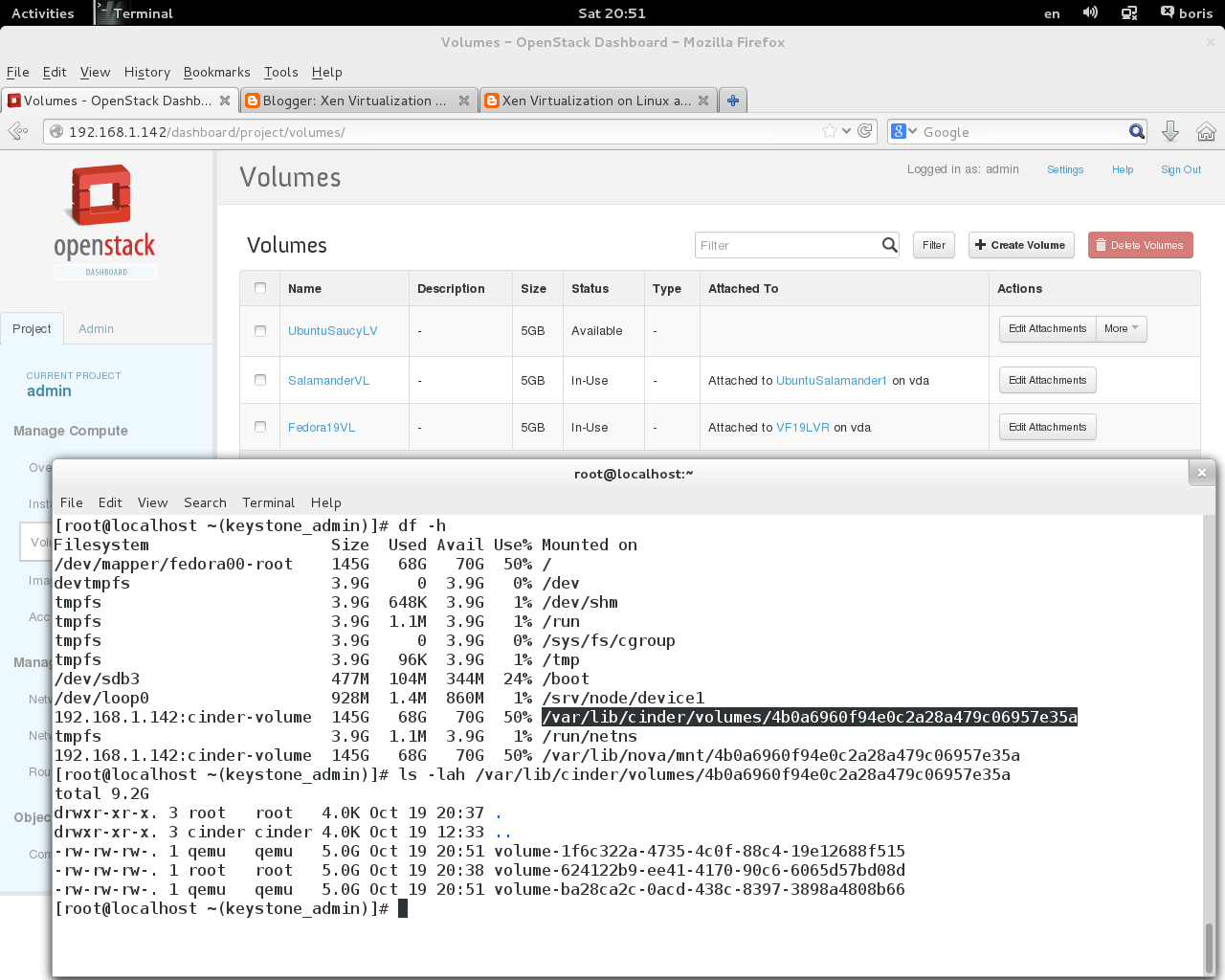
[root@localhost boris(keystone_admin)]# df -h
Filesystem                   Size  Used Avail Use% Mounted on
/dev/mapper/fedora00-root    145G   60G   78G  44% /
devtmpfs                     3.9G     0  3.9G   0% /dev
tmpfs                        3.9G  648K  3.9G   1% /dev/shm
tmpfs                        3.9G 1020K  3.9G   1% /run
tmpfs                        3.9G     0  3.9G   0% /sys/fs/cgroup
tmpfs                        3.9G   96K  3.9G   1% /tmp
/dev/sdb3                    477M  104M  344M  24% /boot
/dev/loop0                   928M  1.4M  860M   1% /srv/node/device1
192.168.1.142:cinder-volume  145G   60G   78G  44% /var/lib/cinder/volumes/4b0a6960f94e0c2a28a479c06957e35a
tmpfs                        3.9G 1020K  3.9G   1% /run/netns

Ready to restart cinder services  


[root@localhost boris(keystone_admin)]# for i in api scheduler volume; do service openstack-cinder-${i} restart; done

Redirecting to /bin/systemctl restart  openstack-cinder-api.service
Redirecting to /bin/systemctl restart  openstack-cinder-scheduler.service
Redirecting to /bin/systemctl restart  openstack-cinder-volume.service


New directory mounted :


[root@localhost boris(keystone_admin)]# df -h
Filesystem                    Size  Used Avail Use% Mounted on
/dev/mapper/fedora00-root     145G   59G   78G  44% /
devtmpfs                      3.9G     0  3.9G   0% /dev
tmpfs                         3.9G  648K  3.9G   1% /dev/shm
tmpfs                         3.9G 1020K  3.9G   1% /run
tmpfs                         3.9G     0  3.9G   0% /sys/fs/cgroup
tmpfs                         3.9G  108K  3.9G   1% /tmp
/dev/sdb3                     477M  104M  344M  24% /boot
/dev/loop0                    928M  1.4M  860M   1% /srv/node/device1
tmpfs                         3.9G 1020K  3.9G   1% /run/netns
192.168.1.142:cinder-volumes  433G  177G  234G  44% /var/lib/cinder/volumes/76078cf31245409735587a509f24ab39

[root@localhost boris(keystone_admin)]# nova image-list
+--------------------------------------+----------------------------+--------+--------+
| ID                                   | Name                       | Status | Server |
+--------------------------------------+----------------------------+--------+--------+
| 807758c4-20fd-41b2-a943-27c80a651fc7 | Fedora19image              | ACTIVE |        |
| 35098ebe-f04d-4c26-bd8c-0bec0f0fb892 | UbuntuSaucyRelease         | ACTIVE |        |
| e8e426f8-8898-42a5-9b3f-0374d20e318b | UbuntuServer1310.image     | ACTIVE |        |
| 8fdc5c6e-1554-4ad2-bcaf-f4aefee7d690 | Windos Server2012 Std Eval | ACTIVE |        |
| 10295ec8-3d8d-4623-9490-f217f8498878 | cirros                     | ACTIVE |        |
+--------------------------------------+----------------------------+--------+--------+

[root@localhost boris(keystone_admin)]# cinder create --image-id 807758c4-20fd-41b2-a943-27c80a651fc7  --display_name Fedora19VL 5
+---------------------+--------------------------------------+
|       Property      |                Value                 |
+---------------------+--------------------------------------+
|     attachments     |                  []                  |
|  availability_zone  |                 nova                 |
|       bootable      |                false                 |
|      created_at     |      2013-10-20T10:05:22.586342      |
| display_description |                 None                 |
|     display_name    |              Fedora19VL              |
|          id         | d11f00de-e543-4ed5-9686-a0421639c5e3 |
|       image_id      | 807758c4-20fd-41b2-a943-27c80a651fc7 |
|       metadata      |                  {}                  |
|         size        |                  5                   |
|     snapshot_id     |                 None                 |
|     source_volid    |                 None                 |
|        status       |               creating               |
|     volume_type     |                 None                 |
+---------------------+--------------------------------------+

[root@localhost boris(keystone_admin)]# cinder list
+--------------------------------------+-----------+--------------+------+-------------+----------+-------------+
|                  ID                  |   Status  | Display Name | Size | Volume Type | Bootable | Attached to |
+--------------------------------------+-----------+--------------+------+-------------+----------+-------------+
| d11f00de-e543-4ed5-9686-a0421639c5e3 | available |  Fedora19VL  |  5   |     None    |   true   |             |
+--------------------------------------+-----------+--------------+------+-------------+----------+-------------+

[root@localhost boris(keystone_admin)]# cinder create --image-id 35098ebe-f04d-4c26-bd8c-0bec0f0fb892 --display_name SalamanderVL 5
+---------------------+--------------------------------------+
|       Property      |                Value                 |
+---------------------+--------------------------------------+
|     attachments     |                  []                  |
|  availability_zone  |                 nova             |
|       bootable         |                false              |
|      created_at       |      2013-10-20T10:07:01.897362      |
| display_description |                 None        |
|     display_name  |             SalamanderVL  |
|          id                | a0102e10-52cb-49d6-bd58-f0365968f721 |
|       image_id       | 35098ebe-f04d-4c26-bd8c-0bec0f0fb892 |
|       metadata      |                  {}               |
|         size             |                  5                 |
|     snapshot_id   |                 None           |
|     source_volid   |                 None          |
|        status          |               creating       |
|     volume_type   |                 None          |
+---------------------+--------------------------------------+

[root@localhost boris(keystone_admin)]# cinder list
+--------------------------------------+-------------+--------------+------+-------------+----------+-------------+
|                  ID                  |    Status   | Display Name | Size | Volume Type | Bootable | Attached to |
+--------------------------------------+-------------+--------------+------+-------------+----------+-------------+
| a0102e10-52cb-49d6-bd58-f0365968f721 | downloading | SalamanderVL |  5   |     None    |   true   |             |
| d11f00de-e543-4ed5-9686-a0421639c5e3 |  available  |  Fedora19VL  |  5   |     None    |   true   |             |
+--------------------------------------+-------------+--------------+------+-------------+----------+-------------+

[root@localhost boris(keystone_admin)]# cinder list
+--------------------------------------+-----------+--------------+------+-------------+----------+-------------+
|                  ID                  |   Status  | Display Name | Size | Volume Type | Bootable | Attached to |
+--------------------------------------+-----------+--------------+------+-------------+----------+-------------+
| a0102e10-52cb-49d6-bd58-f0365968f721 | available | SalamanderVL |  5   |     None    |   true   |             |
| d11f00de-e543-4ed5-9686-a0421639c5e3 | available |  Fedora19VL  |  5   |     None    |   true   |             |
+--------------------------------------+-----------+--------------+------+-------------+----------+-------------+

[root@localhost boris(keystone_admin)]# ls -l /var/lib/cinder/volumes/76078cf31245409735587a509f24ab39
total 1496292
-rw-rw-rw-. 1 root root 5368709120 Oct 20 14:07 volume-a0102e10-52cb-49d6-bd58-f0365968f721
-rw-rw-rw-. 1 root root 5368709120 Oct 20 14:05 volume-d11f00de-e543-4ed5-9686-a0421639c5e3

[root@localhost boris(keystone_admin)]# nova list
+--------------------------------------+-------------------+--------+------------+-------------+--------------------------------+
| ID                                   | Name              | Status | Task State | Power State | Networks                       |
+--------------------------------------+-------------------+--------+------------+-------------+--------------------------------+
| 9754374c-bcf2-4f34-a931-649b417d939d | UbuntuSalamander1 | ACTIVE | None       | Running     | private=10.0.0.3, 192.168.1.61 |
+--------------------------------------+-------------------+--------+------------+-------------+--------------------------------+
[root@localhost boris(keystone_admin)]# nova show  9754374c-bcf2-4f34-a931-649b417d939d
+--------------------------------------+----------------------------------------------------------+
| Property                             | Value                                                    |
+--------------------------------------+----------------------------------------------------------+
| status                               | ACTIVE                                                   |
| updated                              | 2013-10-20T10:16:44Z                                     |
| OS-EXT-STS:task_state                | None                                                     |
| OS-EXT-SRV-ATTR:host                 | localhost.localdomain                                    |
| key_name                             | key2                                                     |
| image                                | Attempt to boot from volume - no image supplied          |
| private network                      | 10.0.0.3, 192.168.1.61                                   |
| hostId                               | 8a06ef818edcb74efba027817c5f14cb4d1d38c0fcd1dde73a9356d6 |
| OS-EXT-STS:vm_state                  | active                                                   |
| OS-EXT-SRV-ATTR:instance_name        | instance-00000013                                        |
| OS-SRV-USG:launched_at               | 2013-10-20T10:16:44.000000                               |
| OS-EXT-SRV-ATTR:hypervisor_hostname  | localhost.localdomain                                    |
| flavor                               | m1.small (2)                                             |
| id                                   | 9754374c-bcf2-4f34-a931-649b417d939d                     |
| security_groups                      | [{u'name': u'default'}]                                  |
| OS-SRV-USG:terminated_at             | None                                                     |
| user_id                              | 239b0f75c0514945acb5bb2041ccd89d                         |
| name                                 | UbuntuSalamander1                                        |
| created                              | 2013-10-20T10:16:35Z                                     |
| tenant_id                            | 644515d6bdf14f53a44f226fd7c9f69b                         |
| OS-DCF:diskConfig                    | MANUAL                                                   |
| metadata                             | {}                                                       |
| os-extended-volumes:volumes_attached | [{u'id': u'a0102e10-52cb-49d6-bd58-f0365968f721'}]       |
| accessIPv4                           |                                                          |
| accessIPv6                           |                                                          |
| progress                             | 0                                                        |
| OS-EXT-STS:power_state               | 1                                                        |
| OS-EXT-AZ:availability_zone          | nova                                                     |
| config_drive                         |                                                          |
+--------------------------------------+----------------------------------------------------------+
[root@localhost boris(keystone_admin)]# cinder list
+--------------------------------------+-----------+--------------+------+-------------+----------+--------------------------------------+
|                  ID                  |   Status  | Display Name | Size | Volume Type | Bootable |             Attached to              |
+--------------------------------------+-----------+--------------+------+-------------+----------+--------------------------------------+
| a0102e10-52cb-49d6-bd58-f0365968f721 |   in-use  | SalamanderVL |  5   |     None    |   true   | 9754374c-bcf2-4f34-a931-649b417d939d |
| d11f00de-e543-4ed5-9686-a0421639c5e3 | available |  Fedora19VL  |  5   |     None    |   true   |                                      |
+--------------------------------------+-----------+--------------+------+-------------+----------+--------------------------------------+

[root@localhost boris(keystone_admin)]# ls -lah /var/lib/cinder/volumes/76078cf31245409735587a509f24ab39
total 1.8G

drwxr-xr-x. 3 root   root   4.0K Oct 20 14:07 .
drwxr-xr-x. 4 cinder cinder 4.0K Oct 20 14:03 ..
-rw-rw-rw-. 1 qemu   qemu   5.0G Oct 20 14:28 volume-a0102e10-52cb-49d6-bd58-f0365968f721
-rw-rw-rw-. 1 root   root   5.0G Oct 20 14:05 volume-d11f00de-e543-4ed5-9686-a0421639c5e3

[root@localhost boris(keystone_admin)]# cd /home/boris
[root@localhost boris(keystone_admin)]# du | grep node.$
637972    ./node3
638368    ./node2
637964    ./node1


    Another snap shots series


Loading Windows 2012 Server via bootable cinder volume located on glusterfs stripe 3 volume.


[root@localhost (keystone_admin)]# nova image-list
+--------------------------------------+------------------------------+--------+--------+
| ID                                   | Name                         | Status | Server |
+--------------------------------------+------------------------------+--------+--------+
| 59758edc-da8d-444e-b0a0-d93d323fc026 | F19Image                     | ACTIVE |        |
| df912358-b227-43a5-94a3-edc874c577bc | UbuntuSalamander             | ACTIVE |        |
| 1e26928b-5df0-4097-bbc6-46832dc8361b | Windows Server 2012 Std Eval | ACTIVE |        |
| ae07d1ba-41de-44e9-877a-455f8956d86f | cirros                       | ACTIVE |        |
+--------------------------------------+------------------------------+--------+--------+
[root@localhost (keystone_admin)]# cinder create --image-id 1e26928b-5df0-4097-bbc6-46832dc8361b  --display_name WinSRV2012 20
+---------------------+--------------------------------------+
|       Property      |                Value                 |
+---------------------+--------------------------------------+
|     attachments     |                  []                  |
|  availability_zone  |                 nova                 |
|       bootable      |                false                 |
|      created_at     |      2013-10-22T06:03:05.019987      |
| display_description |                 None                 |
|     display_name    |              WinSRV2012              |
|          id         | 5812c7e5-d071-43cb-8a1c-81346167d72a |
|       image_id      | 1e26928b-5df0-4097-bbc6-46832dc8361b |
|       metadata      |                  {}                  |
|         size        |                  20                  |
|     snapshot_id     |                 None                 |
|     source_volid    |                 None                 |
|        status       |               creating               |
|     volume_type     |                 None                 |
+---------------------+--------------------------------------+

[root@localhost boris(keystone_admin)]# cinder list
+--------------------------------------+-------------+--------------+------+-------------+----------+--------------------------------------+
|                  ID                  |    Status   | Display Name | Size | Volume Type | Bootable |             Attached to              |
+--------------------------------------+-------------+--------------+------+-------------+----------+--------------------------------------+
| 5812c7e5-d071-43cb-8a1c-81346167d72a | downloading |  WinSRV2012  |  20  |     None    |  false   |                                      |
| be59b5ae-863b-41e2-abf6-de6756398722 |    in-use   | SalamanderVL |  5   |     None    |   true   | 82ba6ffe-dc01-4fcc-b247-7995a5ca7cb8 |
+--------------------------------------+-------------+--------------+------+-------------+----------+--------------------------------------+
[root@localhost boris(keystone_admin)]# ls -lah /var/lib/cinder/volumes/1d42fffa70f6647a45514f6fb5ce40ca
total 16G
drwxr-xr-x. 3 root   root   4.0K Oct 22 10:03 .
drwxr-xr-x. 5 cinder cinder 4.0K Oct 20 16:30 ..
-rw-rw-rw-. 1 root   root    16G Oct 22 10:21 volume-5812c7e5-d071-43cb-8a1c-81346167d72a
-rw-rw-rw-. 1 root   root   5.0G Oct 21 11:12 volume-be59b5ae-863b-41e2-abf6-de6756398722

[root@localhost boris(keystone_admin)]# du | grep node.$
5517480    ./node1
5516684    ./node3
5514680    ./node2
[root@localhost boris(keystone_admin)]# du | grep node.$
6551272    ./node1
6550168    ./node3
6549416    ./node2
[root@localhost boris(keystone_admin)]# cinder list
+--------------------------------------+-----------+--------------+------+-------------+----------+--------------------------------------+
|                  ID                  |   Status  | Display Name | Size | Volume Type | Bootable |             Attached to              |
+--------------------------------------+-----------+--------------+------+-------------+----------+--------------------------------------+
| 5812c7e5-d071-43cb-8a1c-81346167d72a | available |  WinSRV2012  |  20  |     None    |   true   |                                      |
| be59b5ae-863b-41e2-abf6-de6756398722 |   in-use  | SalamanderVL |  5   |     None    |   true   | 82ba6ffe-dc01-4fcc-b247-7995a5ca7cb8 |
+--------------------------------------+-----------+--------------+------+-------------+----------+--------------------------------------+
[root@localhost boris(keystone_admin)]# ls -lah /var/lib/cinder/volumes/1d42fffa70f6647a45514f6fb5ce40ca
total 19G
drwxr-xr-x. 3 root   root   4.0K Oct 22 10:03 .
drwxr-xr-x. 5 cinder cinder 4.0K Oct 20 16:30 ..
-rw-rw-rw-. 1 root   root    20G Oct 22 10:24 volume-5812c7e5-d071-43cb-8a1c-81346167d72a
-rw-rw-rw-. 1 root   root   5.0G Oct 21 11:12 volume-be59b5ae-863b-41e2-abf6-de6756398722
[root@localhost boris(keystone_admin)]# df -h
Filesystem                    Size  Used Avail Use% Mounted on
/dev/mapper/fedora-root       164G   70G   86G  45% /
devtmpfs                      3.9G     0  3.9G   0% /dev
tmpfs                         3.9G   92K  3.9G   1% /dev/shm
tmpfs                         3.9G  964K  3.9G   1% /run
tmpfs                         3.9G     0  3.9G   0% /sys/fs/cgroup
tmpfs                         3.9G  112K  3.9G   1% /tmp
/dev/sda1                     477M   87M  362M  20% /boot
/dev/loop0                    928M  1.4M  860M   1% /srv/node/device1
192.168.1.135:cinder-volumes  490G  209G  257G  45% /var/lib/cinder/volumes/1d42fffa70f6647a45514f6fb5ce40ca
tmpfs                         3.9G  964K  3.9G   1% /run/netns

[root@localhost boris(keystone_admin)]# cinder list
+--------------------------------------+--------+--------------+------+-------------+----------+--------------------------------------+
|                  ID                  | Status | Display Name | Size | Volume Type | Bootable |             Attached to              |
+--------------------------------------+--------+--------------+------+-------------+----------+--------------------------------------+
| 5812c7e5-d071-43cb-8a1c-81346167d72a | in-use |  WinSRV2012  |  20  |     None    |   true   | d6e702c3-16e6-4890-bbe7-22b19ed05263 |
| be59b5ae-863b-41e2-abf6-de6756398722 | in-use | SalamanderVL |  5   |     None    |   true   | 82ba6ffe-dc01-4fcc-b247-7995a5ca7cb8 |
+--------------------------------------+--------+--------------+------+-------------+----------+--------------------------------------+


Friday, October 18, 2013

Glusterfs volume based Havana 2013.2 instances on NFS-Like Standalone Storage Server With GlusterFS 3.4.1 Fedora 19

  Following http://www.gluster.org/category/openstack/


This is a snapshot to show the difference between the Havanna and Grizzly releases with GlusterFS.
Grizzly Havana
Glance – Could point to the filesystem images mounted with GlusterFS, but had to copy VM image to deploy it Can now point to Cinder interface, removing the need to copy image
Cinder – Integrated with GlusterFS, but only with Fuse mounted volumes Can now use libgfapi-QEMU integration for KVM hypervisors
Nova – No integration with GlusterFS Can now use the libgfapi-QEMU integration
Swift – GlusterFS maintained a separate repository of changes to Swift proxy layer Swift patches now merged upstream, providing a cleaner break between API and implementation

Please,  view also nice article: http://www.mirantis.com/blog/openstack-havana-glusterfs-and-what-improved-support-really-means/

Actually, on Glusterfs F19 Server included in cluster procedure of cinder tuning should be the same. First step -  set up Havana RC1 RDO on Fedora 19 per

http://bderzhavets.blogspot.ru/2013/10/neutron-basic-rdo-setup-havana-to-have.html


Post install fix (as of 10/31/2013) :

Also set  ALLOWED_HOSTS = ['*']  in /etc/openstack-dashboard/local_settings and restart  httpd


 Next - installing GlusterFS Server on Cinder host


 #   yum install glusterfs glusterfs-server glusterfs-fuse
 #   systemctl status glusterd

  glusterd.service - GlusterFS an clustered file-system server
   Loaded: loaded (/usr/lib/systemd/system/glusterd.service; enabled)
   Active: active (running) since Fri 2013-10-18 13:47:51 MSK; 2h 37min ago
  Process: 1126 ExecStart=/usr/sbin/glusterd -p /run/glusterd.pid (code=exited, status=0/SUCCESS)
 Main PID: 1136 (glusterd)
   CGroup: name=systemd:/system/glusterd.service
           ├─1136 /usr/sbin/glusterd -p /run/glusterd.pid
           ├─8861 /usr/sbin/glusterfsd -s 192.168.1.135 --volfile-id cinder-volume.192.168.1.135.rhs-brick1-cinder-volume -...
           ├─8878 /usr/sbin/glusterfs -s localhost --volfile-id gluster/nfs -p /var/lib/glusterd/nfs/run/nfs.pid -l /var/lo...
           └─8885 /sbin/rpc.statd

Oct 18 13:47:51 localhost.localdomain systemd[1]: Started GlusterFS an clustered file-system server.
Oct 18 13:58:19 localhost.localdomain  rpc.statd[8885]: Version 1.2.7 starting
Oct 18 13:58:19 localhost.localdomain  sm-notify[8886]: Version 1.2.7 starting
Oct 18 13:58:19 localhost.localdomain  rpc.statd[8885]: Initializing NSM state

 #   mkdir -p /rhs/brick1/cinder-volume
 #  gluster volume create cinder-volume  \
     192.168.1.135:/rhs/brick1/cinder-volume
 #  gluster volume start cinder-volume
 #  gluster volume info

Volume Name: cinder-volume
Type: Distribute
Volume ID: d52c0ba1-d7b1-495d-8f14-07ff03e7db95
Status: Started
Number of Bricks: 1
Transport-type: tcp
Bricks:
Brick1: 192.168.1.135:/rhs/brick1/cinder-volume

A sample of utilizing stripe gluster volume may be viewed here


Configuring Cinder to Add GlusterFS


# openstack-config --set /etc/cinder/cinder.conf DEFAULT volume_driver cinder.volume.drivers.glusterfs.GlusterfsDriver 

# openstack-config --set /etc/cinder/cinder.conf DEFAULT glusterfs_shares_config /etc/cinder/shares.conf 

# openstack-config --set /etc/cinder/cinder.conf DEFAULT glusterfs_mount_point_base /var/lib/cinder/volumes

 # vi /etc/cinder/shares.conf
    192.168.1.135:cinder-volume

:wq


# iptables-save > iptables.dump

Add to *filter section:

-A INPUT -m state --state NEW -m tcp -p tcp --dport 111 -j ACCEPT 
-A INPUT -m state --state NEW -m tcp -p tcp --dport 24007 -j ACCEPT
-A INPUT -m state --state NEW -m tcp -p tcp --dport 24008 -j ACCEPT
-A INPUT -m state --state NEW -m tcp -p tcp --dport 24009 -j ACCEPT 
-A INPUT -m state --state NEW -m tcp -p tcp --dport 24010 -j ACCEPT 
-A INPUT -m state --state NEW -m tcp -p tcp --dport 24011 -j ACCEPT 
-A INPUT -m state --state NEW -m tcp -p tcp --dport 38465:38469 -j ACCEPT
 
# iptables-restore < iptables.dump
 # service iptables restart
  
Restart openstack-cinder-volume service mounts glusterfs volume with no problems with ownership :
# for i in api scheduler volume ; do service openstack-cinder-${i} restart ;done
  Redirecting to /bin/systemctl restart  openstack-cinder-api.service
  Redirecting to /bin/systemctl restart  openstack-cinder-scheduler.service
  Redirecting to /bin/systemctl restart  openstack-cinder-volume.service
 # df -h

Filesystem                   Size  Used Avail Use% Mounted on
/dev/mapper/fedora-root      164G   29G  127G  19% /
devtmpfs                     3.9G     0  3.9G   0% /dev
tmpfs                           3.9G  148K  3.9G   1% /dev/shm
tmpfs                           3.9G  1.1M  3.9G   1% /run
tmpfs                           3.9G     0  3.9G   0% /sys/fs/cgroup
tmpfs                           3.9G  800K  3.9G   1% /tmp
/dev/sda1                    477M   87M  362M  20% /boot
/dev/loop0                   928M  1.4M  860M   1% /srv/node/device1
tmpfs                           3.9G  1.1M  3.9G   1% /run/netns 
192.168.1.135:cinder-volume  164G   29G  127G  19% /var/lib/cinder/volumes/f39d1b2d7e2a2e48af66eceba039b139

 # nova image-list
+--------------------------------------+------------------+--------+--------+
| ID                                   | Name             | Status | Server |
+--------------------------------------+------------------+--------+--------+
| 59758edc-da8d-444e-b0a0-d93d323fc026 | F19Image         | ACTIVE |        |
| df912358-b227-43a5-94a3-edc874c577bc | UbuntuSalamander | ACTIVE |        |
| ae07d1ba-41de-44e9-877a-455f8956d86f | cirros           | ACTIVE |        |
+--------------------------------------+------------------+--------+--------+

Creating volume via command line :

# cinder create --image-id 59758edc-da8d-444e-b0a0-d93d323fc026  --display_name Fedora19VL 5

# cinder list

+--------------------------------------+--------+--------------+------+-------------+----------+
|                  ID                  | Status | Display Name | Size | Volume Type | Bootable |             Attached to              |
+--------------------------------------+--------+--------------+------+-------------+----------+
| 0474ead2-61a8-41dd-8f8d-ef3000266403 | in-use |              |  5   |     None    |   true   | 779b306b-3cb2-48ea-9711-2c42c508b577 |
| da344703-dcf9-450e-9e34-cafb331f80f6 | in-use |  Fedora19VL  |  5   |     None    |   true   | 1a8e5fa5-6a79-43f0-84ee-58e2099b1ebe |
+--------------------------------------+--------+--------------+------+-------------+----------+

 # ls -l /var/lib/cinder/volumes/f39d1b2d7e2a2e48af66eceba039b139

total 5528248

-rw-rw-rw-. 1 qemu qemu 5368709120 Oct 18 16:19 volume-0474ead2-61a8-41dd-8f8d-ef3000266403

-rw-rw-rw-. 1 qemu qemu 5368709120 Oct 18 16:19 volume-da344703-dcf9-450e-9e34-cafb331f80f6


Screen shots on another F19 instance dual booting with first


   Creating via cinder command line Ubuntu 13.10 Server bootable volume in glusterfs storage :


References

http://www.gluster.org/community/documentation/index.php/GlusterFS_Cinder